EGYPT’S NORTH COASTIndependent guide · City · Coast · HomesOCTOBER 2026

RAS EL HEKMA GUIDE · START HERE

Find the answer.
Keep the detail.

A practical starting point for living here, choosing a home, comparing costs, planning a visit or sharing with a client.

YOUR READING PATH

Start with what you need.

Ras El Hekma city comes first. Wadi Yemm and Hacienda Ras El Hekma are the main home references; nearby coast projects give context. Pick a path, or start with a map below.

Each path uses the detailed maps, home plans and practical tools already in the guide.

CHOOSE THE RIGHT MAP

Different questions need different maps.

Keep the geographic coast, the proposed city and the individual home plan in their own frames.

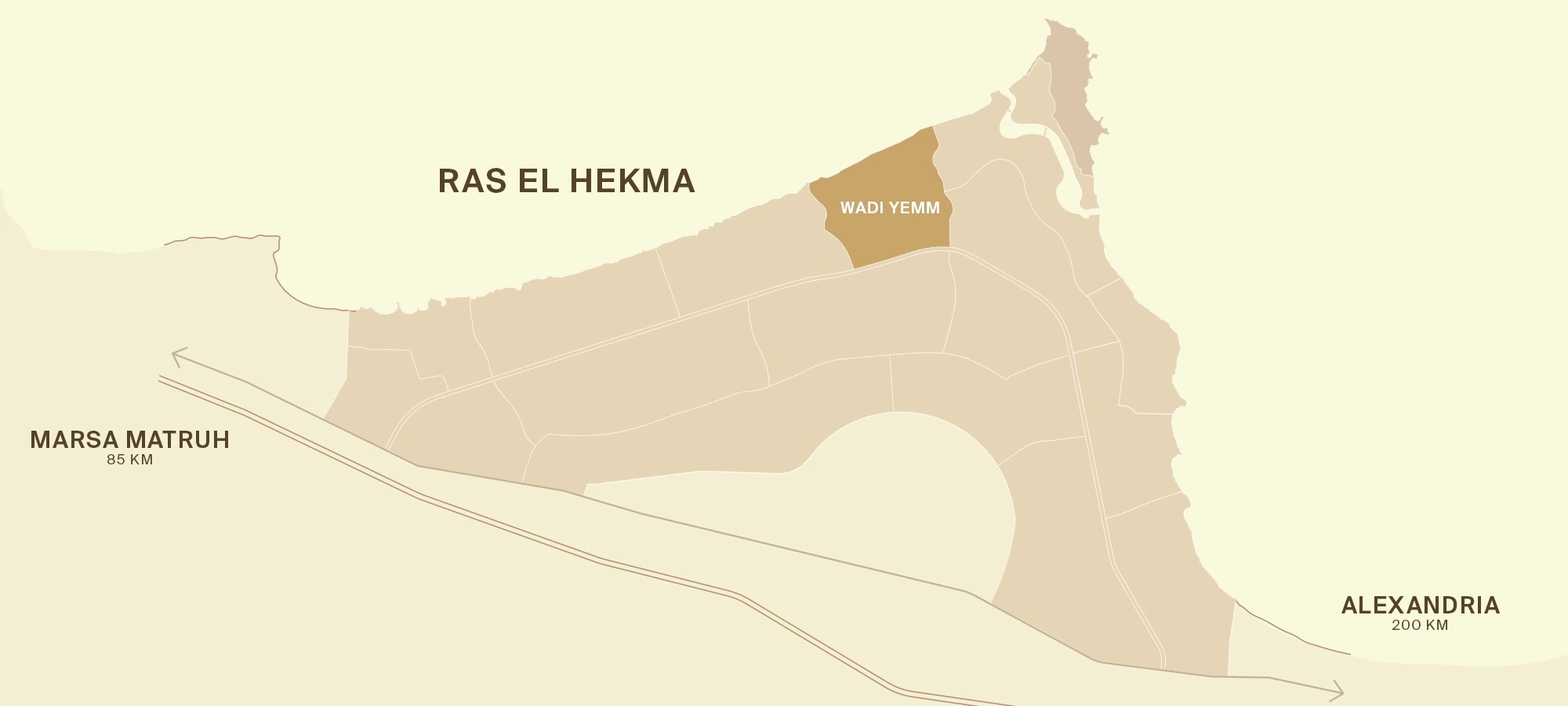
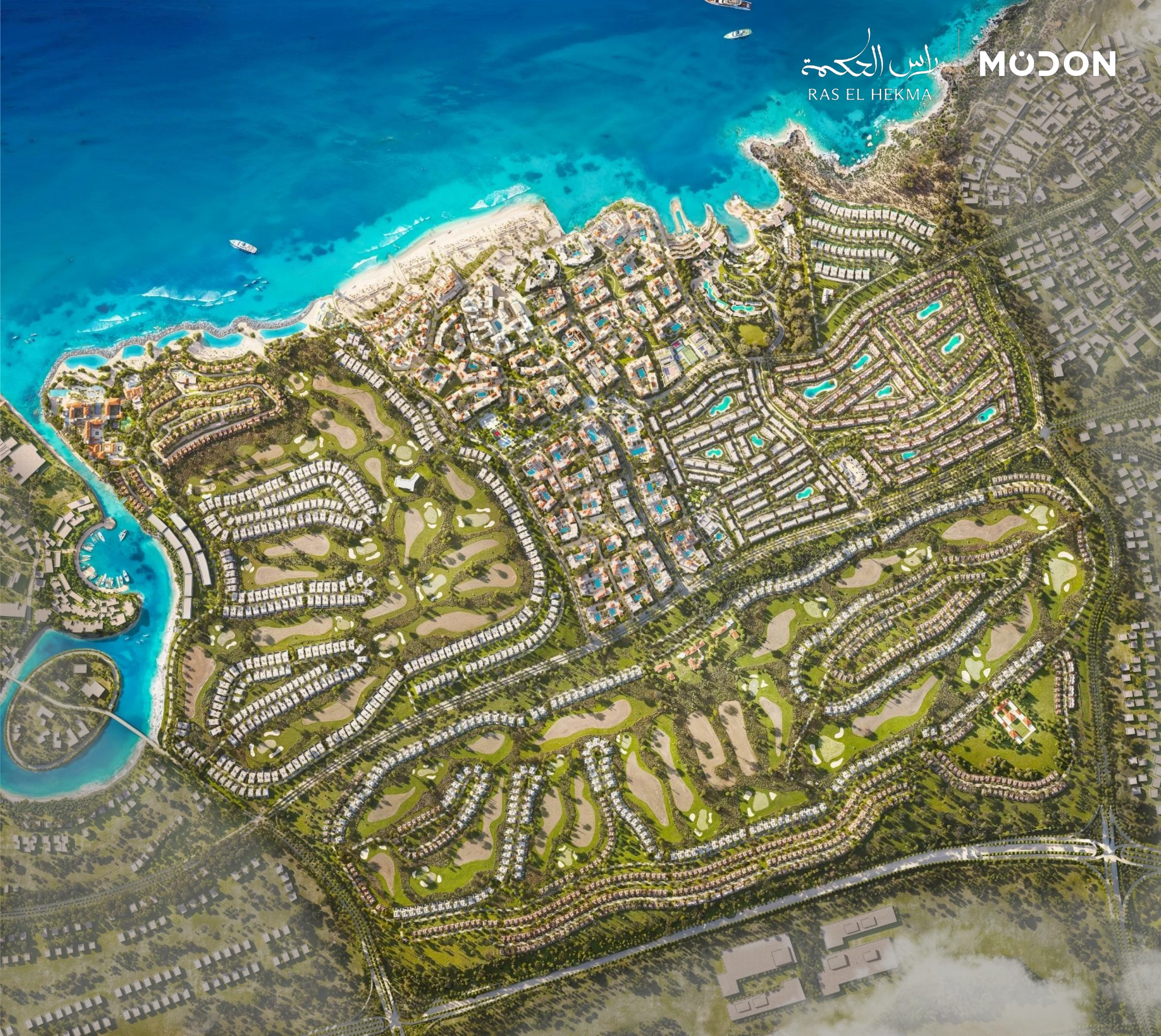
Complete Modon published precinct drawing, without a geographic overlay

The city and its precincts ↗

The published precinct framework and complete city and marina drawings, kept as separate editions.

Use for city structure. The unnamed precincts stay unnamed; this is not a surveyed boundary map.

Modon · published precinct framework · proposed development
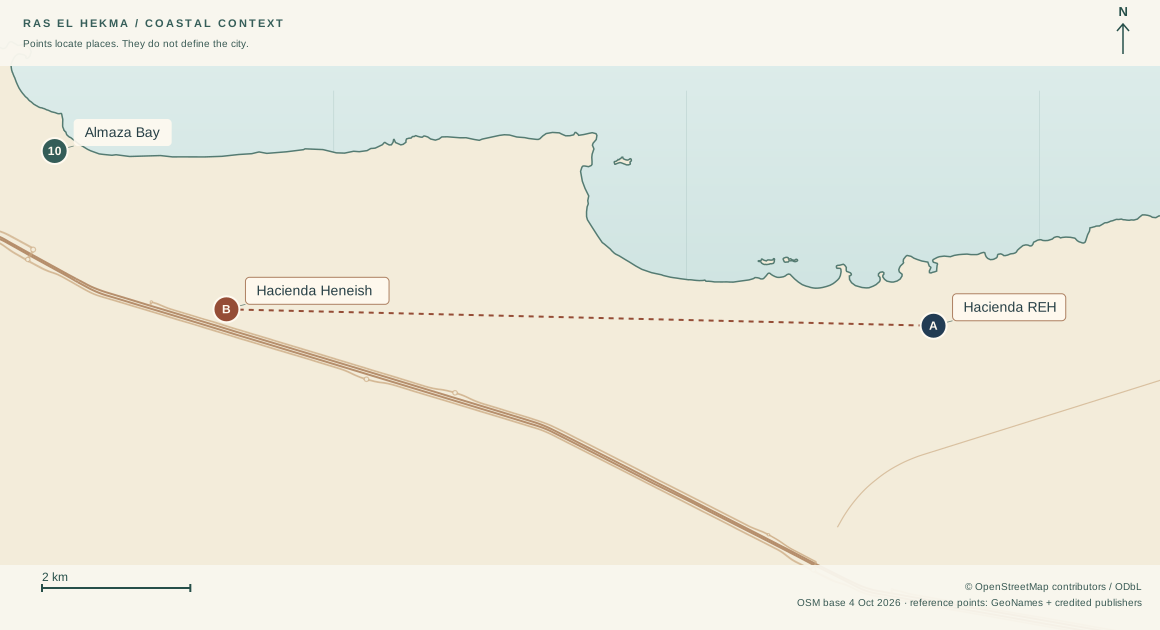
Guide geographic comparison using mapped coastline and named reference points

Where places sit on the coast ↗

Mapped coast and major roads, named reference points and straight-line comparisons.

Use for geographic context. Straight-line distance is not driving time; pins are not gates or parcels.

Original guide map · OpenStreetMap geography · reference points
Complete Wadi Yemm developer drawing in its own source frame

Read the development drawings ↗

Separate city, Wadi and Hacienda editions, including shoreline types and the published legends.

Use the original source frame. These designs do not establish completed shoreline works or current beach access.

Modon · June 2026 Wadi toolkit · proposed development
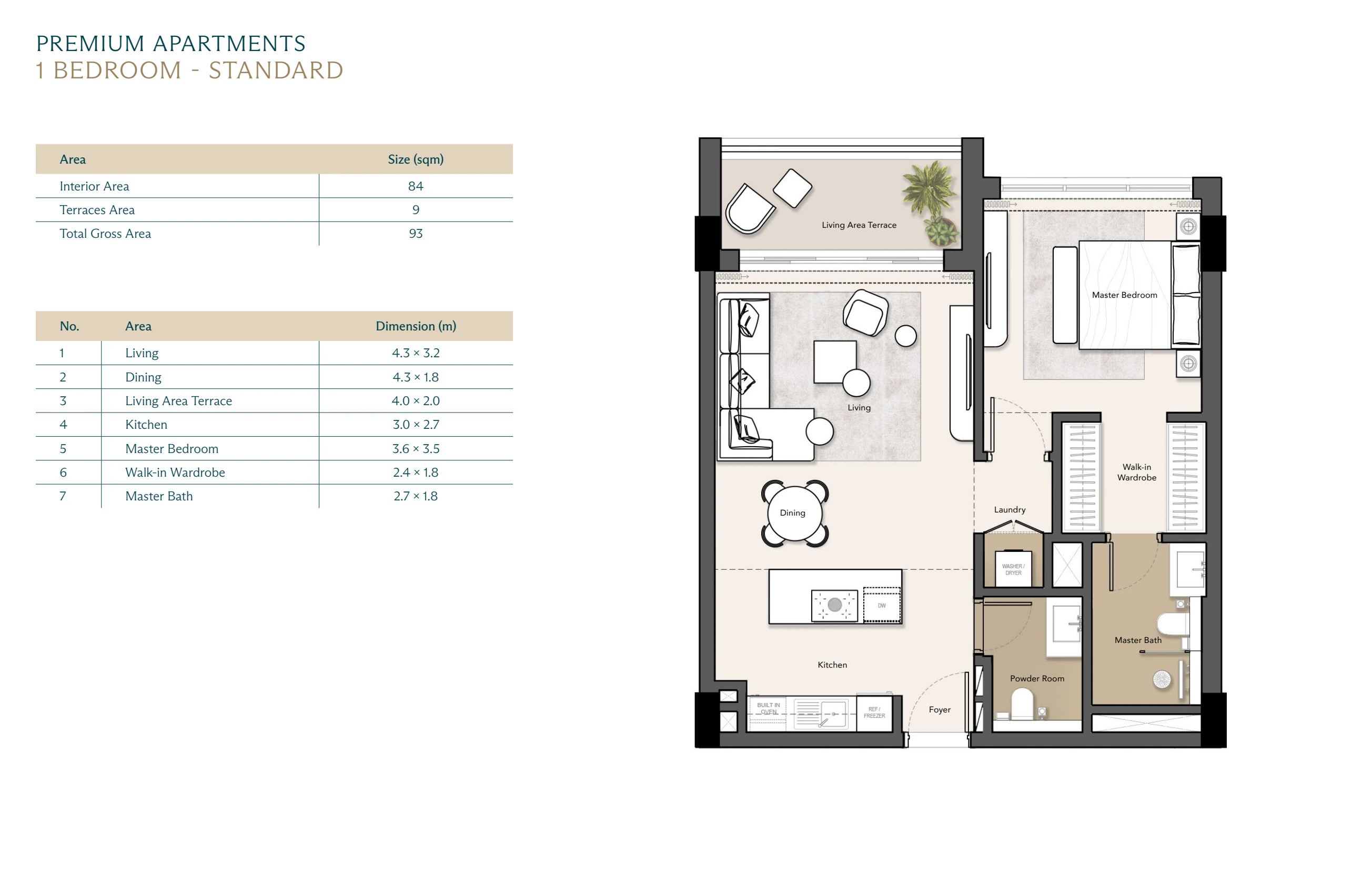
Complete Boulevard one-bedroom apartment source page

Understand a home inside ↗

Complete floor plans, printed room dimensions and bedroom arrangements.

Use for layout reading. Confirm the plan revision, orientation and specification for your exact home.

Modon · Boulevard brochure received 2 October 2026 · proposed design

Live here or stay longer

Start with daily needs. Then use the plans and climate tools to ask about the exact home.

  1. Check what is reported ready ↗

    Separate Shams El Hekma, the railway station and the planned city hotels. Read each report’s date.

    Check for your case: Is the service you need open now, in the place you will stay?

    5 dated reports · 3 separate areas · Open this reader ↗ · Save the reader ↓
  2. Find everyday services ↗

    Read the coastal directory and its published contacts. Use the location notes before planning a trip.

    Check for your case: Does the business serve your exact address, and on which days?

    20 directory rows · 7 reference pins · Open this reader ↗ · Save the reader ↓
  3. Compare the months you will use the home ↗

    Compare historical outdoor temperature, rain, wind and humidity.

    Check for your case: What does the home need for winter stays and humid days?

    420 months · 4 climate measures · Open this reader ↗ · Save the reader ↓
  4. Understand the apartment building ↗

    Compare planned lifts, power, entrances, internet and shared facilities.

    Check for your case: What is included in your signed specification, and what is working today?

    22 topics · Open this reader ↗ · Save the reader ↓
  5. Explore the Sun and a facing direction ↗

    Choose a date and a compass direction. Compare the sky path and daytime length.

    Check for your case: What is the actual home direction? Ask for its shade study.

    365 dates · seasonal paths · Open this reader ↗ · Save the reader ↓
  6. Keep one file of exact-home questions ↗

    Save your own questions and replies for the home you are considering.

    Check for your case: Who gave each answer, when, and in which written document?

    36 questions · 6 topics · Open this reader ↗ · Save the reader ↓
What to keep after this path

Keep an address-specific service list, a home specification and written replies. Regional data and brochure plans cannot confirm conditions inside a home.

Choose another path ↑

Choose a home

Compare the setting, the floor plan and what the area number includes before using a price.

  1. Understand the city plan ↗

    Read the complete city and marina pages and the planned city figures.

    Check for your case: Which precinct and collection is the home in?

    9 complete pages · 15 city figures · Open this reader ↗ · Save the reader ↓
  2. Compare Wadi settings ↗

    Read Boulevard, Beach Plaza and Wadi East & West design views.

    Check for your case: Which view, access route and shared facilities belong to this exact home?

    23 design views · 15 reading points · Open this reader ↗ · Save the reader ↓
  3. Compare apartment and villa layouts ↗

    Read all 13 layouts, their room schedules and where the bedrooms sit.

    Check for your case: Does the drawing match the unit code and plan revision on your quote?

    13 homes · 21 source pages · Open this reader ↗ · Save the reader ↓
  4. Read the area number carefully ↗

    Compare published indoor and terrace area splits on the same scale.

    Check for your case: Is the quote based on gross area, indoor area or another definition?

    13 layouts · 5 published area splits · Open this reader ↗ · Save the reader ↓
  5. Check the Hacienda Crest option ↗

    Read the full floor sequence, printed dimensions and separate area editions.

    Check for your case: Is the penthouse included? Which area and pool specification apply?

    8 pages · 28 dimension pairs · Open this reader ↗ · Save the reader ↓
  6. Finish with the exact-home checks ↗

    Keep price, specification, delivery and access questions in one local file.

    Check for your case: Do the seller’s written answers identify the home and their date?

    36 questions · 6 topics · Open this reader ↗ · Save the reader ↓
What to keep after this path

Leave with a named home, matching plan and area definition. A brochure category or generic starting price does not identify an available unit.

Choose another path ↑

Compare purchase costs

Use dated examples to compare like with like. Keep the area definition and payment timing visible.

  1. Place the investment in the city ↗

    Read the intended city programme before interpreting planned facilities or housing totals.

    Check for your case: Which claims describe a plan, and which have dated delivery evidence?

    9 complete pages · 15 city figures · Open this reader ↗ · Save the reader ↓
  2. Compare dated Sahel examples ↗

    Use examples where the price and area refer to the same home. Read their dates and payment terms.

    Check for your case: Can the seller provide a fresh, dated quote for the exact home?

    25 dated examples · 2 comparison tools · Open this reader ↗ · Save the reader ↓
  3. Check price per square metre ↗

    Compare area definitions. Use a quote for the exact home when testing the price tool.

    Check for your case: Are terraces, land or shared-area allowances included in the denominator?

    13 layouts · 5 published area splits · Open this reader ↗ · Save the reader ↓
  4. See when payments fall due ↗

    Explore the historical Hacienda payment calendar, including its separate maintenance payments.

    Check for your case: Which schedule and maintenance terms apply to your new quote?

    118 purchase months · 4 maintenance payments · Open this reader ↗ · Save the reader ↓
  5. Read sales and supply in context ↗

    Separate dated sales reports, planned homes and development land.

    Check for your case: Does a published sales total tell you anything about current available homes?

    5 dated records · 4 questions · Open this reader ↗ · Save the reader ↓
  6. Record the purchase questions ↗

    Keep exact-home price, payment, delivery and running-cost questions with written replies.

    Check for your case: Which fees, payment changes and ongoing charges remain unconfirmed?

    36 questions · 6 topics · Open this reader ↗ · Save the reader ↓
What to keep after this path

Keep the quoted price, area definition, payment dates and separate charges together. These guide examples do not establish current availability, rent, resale gains or returns.

Choose another path ↑

Plan a visit

Choose a real place to stay, then separate travel references from confirmed routes and entry.

  1. Know the place you are visiting ↗

    Read dated reports from the city, Shams El Hekma and the station separately.

    Check for your case: Which destination do you mean when you say Ras El Hekma?

    5 dated reports · 3 separate areas · Open this reader ↗ · Save the reader ↓
  2. Compare stays and hotel stages ↗

    Separate nearby operator booking routes from the city’s announced hotels. Read facility dates.

    Check for your case: Confirm rooms, facilities and check-in requirements directly before travelling.

    5 hotel readings · 6 geographic references · Open this reader ↗ · Save the reader ↓
  3. Check names and locations ↗

    Compare named geographic reference points, including The Med and the different Hacienda projects.

    Check for your case: Is the destination name and shared location the one you intended?

    16 points · 120 comparisons · Open this reader ↗ · Save the reader ↓
  4. Prepare a practical service list ↗

    Read coastal service contacts and location limits.

    Check for your case: Check opening hours, delivery area and any items you need before arrival.

    20 directory rows · 7 reference pins · Open this reader ↗ · Save the reader ↓
  5. Choose the month with context ↗

    Compare historical coastal weather by month.

    Check for your case: Use a current forecast near your travel date; this reader is not a forecast.

    420 months · 4 climate measures · Open this reader ↗ · Save the reader ↓
What to keep after this path

Keep the confirmed booking, shared destination and current contact replies. A map point or development announcement does not confirm a public entrance or beach access.

Choose another path ↑

Share with a buyer or client

Send a neutral guide link and add the exact-home documents separately. Let the reader see what each comparison means.

  1. Start with the city, in its own frame ↗

    Use the developer’s complete city pages and planned figures.

    Check for your case: Do not present an unnamed precinct as a confirmed launch.

    9 complete pages · 15 city figures · Open this reader ↗ · Save the reader ↓
  2. Show the original plan readings ↗

    Compare city, Wadi and Hacienda source drawings with their own legends and positions.

    Check for your case: Keep each drawing’s edition and proposed-design status visible.

    10 drawings · 50 readings · Open this reader ↗ · Save the reader ↓
  3. Explain nearby alternatives ↗

    Show full project names and geographic reference points.

    Check for your case: Nearby coast projects are context; a pin does not prove city membership.

    16 points · 120 comparisons · Open this reader ↗ · Save the reader ↓
  4. Explain the selected home ↗

    Show the matching floor arrangement, room schedule and source plan.

    Check for your case: Supply the exact unit code and matching plan revision separately.

    13 homes · 21 source pages · Open this reader ↗ · Save the reader ↓
  5. Explain the dated price comparison ↗

    Read same-home price and area examples with their payment terms.

    Check for your case: Do not turn a historical example into a current offer or available stock.

    25 dated examples · 2 comparison tools · Open this reader ↗ · Save the reader ↓
  6. Give the reader a useful question file ↗

    Help the reader keep written replies for their exact home. Notes stay on their device.

    Check for your case: Ask for documents that identify the home, the answer and the date.

    36 questions · 6 topics · Open this reader ↗ · Save the reader ↓
What to keep after this path

Share one neutral page. The public guide has no broker logo, lead form or client database. Private unit offers and chats stay outside the public library.

Choose another path ↑

ALL 34 SAVED READERS

Go straight to a subject.

The whole guide

Maps and plans

The city and homes

Prices and payments

Everyday life

Need arrival, healthcare or other online references? Search the full guide. For files to keep on your device, open the complete library.

THE GEOGRAPHIC LANDSCAPE

Read the height behind the coast.

Explore the historical land-height map and move a section across the cape. Keep this broad landscape model separate from present ground levels and exact-home views.

Explore terrain and height sections ↗